 Rohit Gupta
Scrapy vs Octoparse vs BeautifulSoup
A lot of the data I want for side projects (and some for work) doesn’t come as a tidy download. It sits on web pages, spread over dozens of paginated listings. Every few months someone asks me which tool they should use to get it out, and my answer is always “it depends”, which is true and not very helpful. So this post is the longer answer. I compare three approaches I have used: BeautifulSoup with requests, Scrapy, and Octoparse, a commercial point-and-click desktop tool.
All the examples use two sandbox sites that exist so people can practice scraping without bothering anyone: quotes.toscrape.com and books.toscrape.com. Versions as I write this in April 2019 are Scrapy 1.6 and BeautifulSoup 4.7, but nothing below depends on anything exotic.
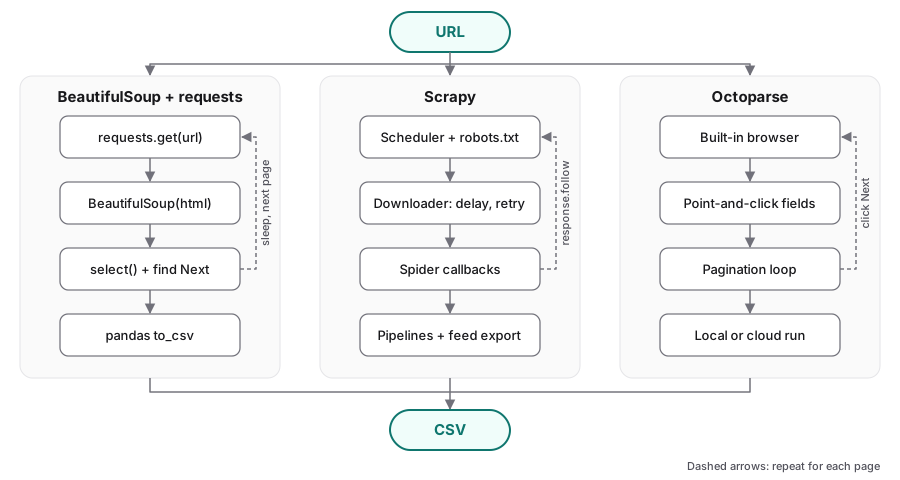
All three start from a URL and end with a CSV; the difference is how much of the middle you write yourself.
Rules first
Before writing a single selector, I go through a short checklist. Scraping is easy to do badly, and the people running the site pay for your mistakes in server load.
- Look for an API or a data download. Many sites (government portals, NCBI, weather services) offer an official API or bulk files. Those are faster, more stable, and clearly allowed. Scraping is the fallback, not the first move.
- Read
robots.txtand the terms of use.robots.txttells crawlers which paths the site owner wants left alone. The terms of use may forbid automated collection outright. If they do, stop there. - Rate-limit. One request per second or slower is a reasonable default for a small site. Never hammer a server with parallel requests because your tool makes it easy.
- Identify yourself. Set a
User-Agentstring that says who you are and how to reach you, instead of pretending to be a browser. - Don’t collect personal data. Names, emails, profiles: just don’t, unless you have a very clear legal and ethical basis. The sandbox sites have quotes from dead authors and fictional books, which is part of why I like them.
- Cache responses. If you are going to rerun your parser ten times while you fix it, save the raw pages so you only download them once.
Python’s standard library can check robots.txt for you:
from urllib.robotparser import RobotFileParser

rp = RobotFileParser("https://quotes.toscrape.com/robots.txt")
rp.read()
print(rp.can_fetch("rohit-quotes-tutorial", "https://quotes.toscrape.com/page/2/"))
If the file doesn’t exist, RobotFileParser treats everything as allowed and this prints True. That still doesn’t override the terms of use.
BeautifulSoup + requests
This is where most people start, and for good reason. requests downloads a page, BeautifulSoup turns the HTML into a tree you can search, and you write ordinary Python around them. There is no framework to learn. Install with:
pip install requests beautifulsoup4 pandas
Fetching and parsing one page
Each quote on quotes.toscrape.com sits inside a <div class="quote"> with the text in span.text, the author in small.author, and tags as a.tag links. BeautifulSoup’s select (returns a list) and select_one (returns the first match or None) take CSS selectors, which I find easier to read than chains of find_all calls.
import requests
from bs4 import BeautifulSoup

headers = {"User-Agent": "rohit-quotes-tutorial/0.1 (contact: [email protected])"}
response = requests.get("https://quotes.toscrape.com/", headers=headers, timeout=10)
response.raise_for_status()

soup = BeautifulSoup(response.text, "html.parser")
first = soup.select_one("div.quote")
print(first.select_one("span.text").get_text(strip=True))
print(first.select_one("small.author").get_text(strip=True))
print([a.get_text() for a in first.select("a.tag")])
I use html.parser because it ships with Python. lxml is faster and more forgiving of broken HTML, but it is one more thing to install, and for a few hundred pages the speed difference doesn’t matter.
Following pagination, with a delay, into a CSV
The site has ten pages of quotes, linked by a “Next” button inside <li class="next">. The pattern for most paginated sites is the same: parse the page, look for the next link, sleep, repeat until there is no next link. urljoin turns the relative href (/page/2/) into a full URL.
import time
from urllib.parse import urljoin

import pandas as pd
import requests
from bs4 import BeautifulSoup

BASE_URL = "https://quotes.toscrape.com/"
HEADERS = {"User-Agent": "rohit-quotes-tutorial/0.1 (contact: [email protected])"}
DELAY_SECONDS = 1.0


def parse_quotes(soup):
    rows = []
    for quote in soup.select("div.quote"):
        rows.append({
            "text": quote.select_one("span.text").get_text(strip=True),
            "author": quote.select_one("small.author").get_text(strip=True),
            "tags": ";".join(t.get_text(strip=True) for t in quote.select("a.tag")),
        })
    return rows


def scrape_all(start_url=BASE_URL):
    rows = []
    url = start_url
    with requests.Session() as session:
        session.headers.update(HEADERS)
        while url:
            response = session.get(url, timeout=10)
            response.raise_for_status()
            soup = BeautifulSoup(response.text, "html.parser")
            rows.extend(parse_quotes(soup))

            next_link = soup.select_one("li.next > a")
            url = urljoin(url, next_link["href"]) if next_link else None
            if url:
                time.sleep(DELAY_SECONDS)
    return rows


quotes = pd.DataFrame(scrape_all())
quotes.to_csv("quotes.csv", index=False)
print(quotes.shape)
print(quotes.head())
When I ran this it printed (100, 3): ten pages of ten quotes, with text, author and a semicolon-separated tag string. A requests.Session reuses the connection between pages and keeps the headers in one place.
This is about as simple as scraping gets, and for a one-off pull of a few hundred pages it is what I reach for. The cost shows up as the job grows. Retries on timeouts, caching, skipping URLs you have already seen, running several requests at once without overloading the site, resuming after a crash: you can write all of that yourself, and after the third project you realize you have written a worse version of Scrapy. (For caching specifically, the requests-cache package plugs into requests with a couple of lines.)
Scrapy
Scrapy is a crawling framework. You write a spider class that says where to start and how to parse each kind of page, and Scrapy handles the rest:
- a scheduler that queues requests and drops duplicates,
- concurrency built on Twisted, so many requests can be in flight at once (within the limits you set),
- automatic retries for failed requests,
- item pipelines for cleaning, validating and storing records,
- politeness settings:
ROBOTSTXT_OBEYto respectrobots.txt,DOWNLOAD_DELAYfor a fixed gap between requests, andAUTOTHROTTLE_ENABLEDto adjust the delay based on how fast the server responds, - an HTTP cache (
HTTPCACHE_ENABLED) so reruns while debugging don’t touch the network, - feed exports that write CSV, JSON or JSON Lines with a command-line flag.
The trade-off is that you have to learn the framework’s shape: callbacks, Request objects, settings, and the fact that it is asynchronous under the hood. Install it with pip install scrapy.
A spider for books.toscrape.com
books.toscrape.com has a sidebar with one link per category, and each category’s listing is paginated with a “next” link. The spider below starts at the home page, follows every category link, collects each book on the listing page, then follows “next” until the category runs out. response.follow accepts a relative URL or even a link selector directly, which saves a lot of urljoin calls.
# Schematic: run with scrapy runspider, not as a notebook cell
import scrapy


class BooksSpider(scrapy.Spider):
    name = "books"
    allowed_domains = ["books.toscrape.com"]
    start_urls = ["https://books.toscrape.com/"]

    custom_settings = {
        "ROBOTSTXT_OBEY": True,
        "USER_AGENT": "rohit-books-tutorial/0.1 (contact: [email protected])",
        "DOWNLOAD_DELAY": 1.0,
        "AUTOTHROTTLE_ENABLED": True,
        "CONCURRENT_REQUESTS_PER_DOMAIN": 2,
        "HTTPCACHE_ENABLED": True,
    }

    def parse(self, response):
        # The nested list skips the top-level "Books" link, so each book is seen once.
        for link in response.css("div.side_categories ul li ul li a"):
            yield response.follow(link, callback=self.parse_category)

    def parse_category(self, response):
        category = response.css("div.page-header h1::text").get()
        for book in response.css("article.product_pod"):
            yield {
                "category": category,
                "title": book.css("h3 a::attr(title)").get(),
                "price": book.css("p.price_color::text").get(),
                "rating": book.css("p.star-rating::attr(class)").get().replace("star-rating", "").strip(),
                "in_stock": "In stock" in " ".join(book.css("p.availability::text").getall()),
                "url": response.urljoin(book.css("h3 a::attr(href)").get()),
            }

        next_page = response.css("li.next a::attr(href)").get()
        if next_page:
            yield response.follow(next_page, callback=self.parse_category)
A few details about that spider:
- Each
yieldof a dict becomes an item. Eachyieldof a request goes back to the scheduler. One callback can do both, which is how the pagination works. - The title comes from the link’s
titleattribute because the visible text is truncated for long titles (“In a Dark, Dark …”). - The star rating is encoded as a CSS class (
star-rating Four), so I strip the prefix and keep the word. custom_settingskeeps the politeness settings with the spider. In a full project they would usually live insettings.py.
Save that as books_spider.py and run it without creating a project:
scrapy runspider books_spider.py -o books.csv
The output is 1,000 rows, one per book, across the 50 categories. With a one second delay it takes a couple of minutes, most of it spent deliberately waiting. Note that -o appends to an existing file, so delete books.csv before rerunning or you will get duplicates.
As a project, with a pipeline
For anything I expect to rerun, I make a proper project. It gives you a settings.py, a place for pipelines, and a layout that goes into git cleanly.
scrapy startproject bookscrape
cd bookscrape
# put the spider in bookscrape/spiders/books.py, then:
scrapy crawl books -o books.csv
The generated settings.py already has ROBOTSTXT_OBEY = True. Prices come through as strings like £47.82, which is annoying for analysis, so here is a tiny pipeline that converts them to floats:
# Schematic: run with scrapy runspider, not as a notebook cell
# bookscrape/pipelines.py
class PricePipeline:
    def process_item(self, item, spider=None):
        item["price"] = float(item["price"].lstrip("£"))
        return item
And it gets switched on in settings.py:
# Schematic: run with scrapy runspider, not as a notebook cell
# bookscrape/settings.py
ITEM_PIPELINES = {
    "bookscrape.pipelines.PricePipeline": 300,
}
The number sets the order when you have several pipelines (lower runs first). The same mechanism is how you would drop incomplete items, deduplicate, or write to a database instead of a CSV.
Octoparse
Octoparse is a different kind of tool. It is a commercial desktop application for people who would rather not write code, and it is the one I get asked about most by colleagues outside programming-heavy labs. I have used it on a couple of small jobs. I’ll describe the workflow in general terms, because the details change between releases and I don’t want to state features or prices I’m not sure of. Check the vendor’s site for the current version, platforms, plans and limits.
The general workflow looks like this:
- Open the page in the built-in browser. You paste in a URL (say, a books.toscrape.com category page) and the page loads inside the application.
- Point and click. You click on an element you want, such as a book title. The tool highlights similar elements on the page and offers to select them all. You repeat for price, rating and so on, and it builds a table of fields.
- Auto-detect. There is also an option to let the tool guess the repeating structure of the page (a list of products, a table) and propose fields for you. On a clean page like books.toscrape.com this works well. On messy pages you end up correcting it.
- Pagination loops. You click the “next” button and tell the tool to keep clicking it, and the extraction runs inside that loop. Loops over a list of URLs or over links on a page work the same way.
- Run locally or in the cloud. You can run the task on your own machine, or (depending on your plan) on the vendor’s servers, which can also be scheduled.
- Export. Results come out as a spreadsheet-style file such as CSV or Excel, or through other export options the vendor provides.
What I like: someone who has never seen HTML can get the books.toscrape.com data into a spreadsheet in an afternoon. Because it drives a real browser, pages that build their content with JavaScript usually just work. What I don’t like, as a scientist: the task definition lives inside the application’s own format, not in a text file I can diff, review, or rerun from a script on a cluster. It is also closed source and priced by the vendor, so your pipeline depends on their plans and their roadmap. And the same rules apply as with code. A point-and-click tool can send a lot of requests very quickly if you let it, so look for its delay or wait settings and use them.
Pages that need JavaScript
Neither requests nor Scrapy runs JavaScript. They download the HTML the server sends, and if the page builds its content in the browser afterwards, that content isn’t there. The quotes sandbox has a version that does exactly this:
import requests
from bs4 import BeautifulSoup

headers = {"User-Agent": "rohit-quotes-tutorial/0.1 (contact: [email protected])"}
html = requests.get("https://quotes.toscrape.com/js/", headers=headers, timeout=10).text
soup = BeautifulSoup(html, "html.parser")
print(len(soup.select("div.quote")))  # 0: the quotes are added by a script
The page looks identical in a browser, but the quotes are inserted by JavaScript after it loads. Octoparse handles this case because it has a browser built in. With code, the options in 2019 are:
- Look for the data source first. Open the browser’s developer tools, watch the Network tab, and see whether the page fetches JSON from an endpoint. The infinite scroll version of the sandbox (
/scroll) loads its quotes from/api/quotes?page=1, which you can request directly and read withresponse.json(). When this works it is the fastest and cleanest option by far. - Selenium drives a real browser (Chrome or Firefox, headless if you like) from Python. You load the page, wait for the content, then hand
driver.page_sourceto BeautifulSoup. It is slow and heavy, but it renders whatever a browser would. - Splash with scrapy-splash. Splash is a lightweight rendering service that runs in Docker, and the
scrapy-splashplugin lets a spider send requests through it and get rendered HTML back. This keeps the Scrapy scheduling and pipelines while adding rendering.
I won’t go deeper here. Rendering is a big enough topic for its own post, and for most of my use cases the Network tab trick has saved me from needing it.
Side by side
| BeautifulSoup + requests | Scrapy | Octoparse | |
|---|---|---|---|
| Learning curve | Low if you know Python | Medium: callbacks, settings, async model | Low, no code needed |
| Scale | Fine for hundreds of pages; beyond that you build your own plumbing | Built for thousands to millions of pages | Depends on your machine or your cloud plan |
| JavaScript pages | No; add Selenium or find the JSON endpoint | No; add scrapy-splash or Selenium, or find the JSON endpoint | Yes, built-in browser |
| Cost | Free, open source | Free, open source | Commercial; check the vendor’s plans |
| Politeness controls | Whatever you write (time.sleep, your own checks) |
Built in: ROBOTSTXT_OBEY, DOWNLOAD_DELAY, AutoThrottle, cache |
Tool settings for waits and delays |
| Reproducibility and version control | Plain Python script, easy to commit and rerun | Plain Python project, easy to commit, review and schedule | Task lives in the application’s own format |
Which one when
- A one-off pull of a few pages to a few hundred pages: BeautifulSoup and requests. Write the script, add a delay, save the raw HTML if you’ll be iterating, commit the script next to the data.
- A crawl you’ll rerun, or anything beyond a few hundred pages, or many page types: Scrapy. The time spent learning it pays back the first time a crawl fails halfway through and you don’t have to start over. The cache alone justifies it when you’re debugging parsers.
- A colleague who doesn’t code and needs a spreadsheet from a JavaScript-heavy site: Octoparse (or something like it) is a reasonable choice, with the caveat that the result is harder to reproduce and you are tied to a vendor.
- Any of the above when the site offers an API or download: use the API or the download.
For my own work the reproducibility row decides it. If the data goes into an analysis I might have to defend later, I want the scraper in git next to the analysis code, which rules out a point-and-click task file. The two scripts from this post are under 50 lines each. Run them against the sandbox and you will have quotes.csv with 100 rows and books.csv with 1,000, which is a good test that your setup works before you point it at a real site.