 Rohit Gupta
Minty: designing a self-hosted personal finance aggregator
I wanted one list of every transaction across the accounts and cards I use, with my own tags and a search box. Plenty of apps do that. The free ones pay for themselves with ads, card offers, or what they can learn from your spending, and even the good paid ones mean a company holds a copy of your bank history. I wanted the version where the data sits in accounts I own and nobody else is in the loop.
That’s Minty. It pulls transactions through Plaid into a small database, shows them on one private dashboard with tags, search and per-person totals, and runs entirely on free plans. The code is public under MIT; each household runs its own copy with its own keys.
My requirements, roughly in priority order:
- Data and keys stay in the household’s own accounts. Whoever wrote the code (me) can’t see anyone else’s data.
- No server to look after, and about $0 a month.
- Anyone I know can run a copy by forking the repo and following a checklist in a browser.
- Fail closed. A missing setting should mean nothing is served, not everything.
- My tags survive. A sync must never overwrite a label I added.
Where it started, and why it moved
The first version was a FastAPI service and a Postgres database in Docker, with sync on a background thread, reached privately over Tailscale Serve. That’s a fine setup for one tinkerer, but running it meant an always-on box, Docker and a tailnet, which is not something I could hand to a friend. So I rewrote it as a Cloudflare Worker in TypeScript with a D1 database, one deployment per household. The Python version was never deployed with real data, so there was nothing to migrate; its last commit is tagged python-app-final. If you see FastAPI and Postgres mentioned around the repo, that’s the old design.
The schematic
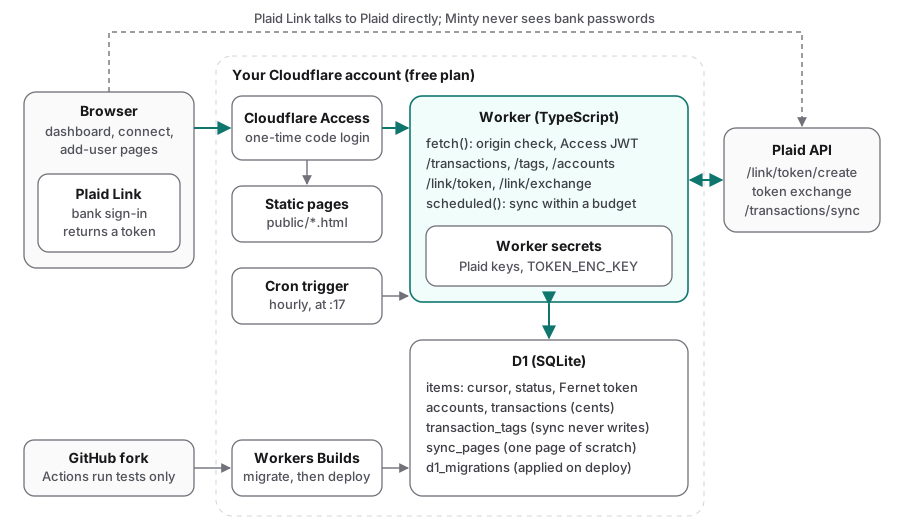
Everything except Plaid lives in the household’s own Cloudflare account; the Worker is the only component that holds Plaid keys or talks to Plaid’s API.
The pieces:
- Cloudflare Access guards the whole hostname, pages and API alike, with an emailed one-time code.
- One Worker serves the static pages from
public/, answers the API routes, and runs ascheduled()handler for sync. - D1 (Cloudflare’s SQLite) holds linked logins, accounts, transactions and tags.
- Plaid is called with plain
fetch(). Plaid’s SDKs don’t target Workers, and the client needed is about a hundred lines. - Workers Builds deploys from the household’s GitHub fork. GitHub Actions only runs tests.
The Worker’s entry point is small: a table of [method, regex, handler] routes, a cross-site check, the Access check, then dispatch. Anything that isn’t an API route goes to the static assets.
Linking an account
Linking uses Plaid Link, Plaid’s own sign-in widget. The flow:
- The connect page sends
POST /link/tokenwith the person the login belongs to. The Worker picks which Plaid credentials to use (more on that below) and asks Plaid for a link token with thetransactionsproduct and up to 730 days of history (Plaid’s default is 90). - The browser opens Plaid Link with that token. You sign in to your bank inside Plaid’s window, so Minty never sees a bank password.
- Link hands the page a short-lived
public_token, which the page posts to/link/exchange. - The Worker exchanges it for an access token, encrypts it, stores the login, starts the first sync in the background, and returns.
const { body: resp } = await plaidPost<{ access_token: string; item_id: string }>(
  env, credsFor(env, config, plaidAccount), "/item/public_token/exchange", { public_token: publicToken });
const enc = await fernetEncrypt(resp.access_token, key);

const item = await env.DB.prepare(
  `INSERT INTO items (owner, plaid_account, plaid_item_id, access_token_enc, institution_name)
   VALUES (?, ?, ?, ?, ?)
   ON CONFLICT (plaid_item_id) DO UPDATE SET access_token_enc = excluded.access_token_enc, status = 'good'
   RETURNING *`).bind(owner, plaidAccount, resp.item_id, enc, institution).first<ItemRow>();

// One page now; the rest of the history arrives on cron runs.
ctx.waitUntil(syncItem(env, config, item!, { pages: 1, bytes: 150_000 }));
Re-linking the same login refreshes its token instead of tripping the unique key. Some banks use an OAuth redirect that navigates away from the page, so the connect page saves the link token and credential slot in localStorage before opening Link and resumes with the same ones when the bank sends you back. When a bank needs you to sign in again, the login is marked login_required, and the connect page offers a Reconnect button that opens Link in update mode with the stored access token.
People and credential slots
People come from one setting, MINTY_USERS, as key:Name pairs. The default is a single person, and the dashboard only grows a person switch (Combined, then each name) once there are two or more. Each row in the database carries an owner, which drives filtering and totals.
Separately, each login is bound to a plaid_account: the set of Plaid credentials it was linked under. Plaid’s free Trial covers 10 logins per Plaid account, so each person gets ordered credential slots (primary,backup by default, configurable with PLAID_SLOTS). A new link goes to the person’s first slot that has keys and is under the cap, and never to someone else’s:
for (const key of config.ownerAccounts.get(owner) ?? []) {   // e.g. me_primary, me_backup
  if (!isConfigured(env, config, key)) { firstWithoutKeys ??= key; continue; }
  if ((await countItems(env, key)) < config.itemCap) return key;
}
The README is upfront that using several Trial accounts per person to stretch the cap is a terms-of-service gray area, and that one paid Plaid account per person is the clean alternative. The cap is a setting, so either works.
Storage schema
D1 is SQLite, and the schema is four tables plus one scratch table:
items: one row per linked login, with its owner, credential slot, Plaid item id, the encrypted access token, the sync cursor and a status (good,login_requiredorerror).accounts: name, mask (the last four digits; Plaid never returns full numbers), type and balances.transactions: keyed on Plaid’s transaction id, which makes every write idempotent.transaction_tags: user labels, kept apart from synced data.sync_pages: room for one sync page while it’s being saved.
Two choices were deliberate. Money is stored as integer cents so totals are exact, keeping Plaid’s sign convention (positive means money out); the API converts to dollars and the dashboard flips the sign for display. And tags live in their own table:
CREATE TABLE transaction_tags (
    transaction_id INTEGER NOT NULL REFERENCES transactions (id) ON DELETE CASCADE,
    tag            TEXT    NOT NULL COLLATE NOCASE,    /* 'Travel' and 'travel' are one tag */
    position       INTEGER NOT NULL,                   /* keeps the user's order on the row */
    PRIMARY KEY (transaction_id, tag)
);
Sync never writes that table, so “re-syncs keep my tags” holds by construction rather than by careful code. Migrations live in d1/migrations/, are tracked in D1’s d1_migrations table, and are applied on every deploy. An applied migration is never edited; changes go in a new file.
Sync
Plaid’s /transactions/sync is cursor-based: send the last cursor, get back added, modified and removed transactions plus the accounts, a next_cursor and has_more. Minty polls it from a cron trigger every hour at 17 minutes past (UTC). There’s no webhook, because Plaid can’t get past Access, and Plaid itself only refreshes most banks a few times a day, so hourly polling loses nothing. There’s also no HTTP endpoint that triggers a sync, on purpose, and a test checks that one hasn’t crept in.
Fitting in 10 ms of CPU
The Workers free plan allows 10 ms of CPU per invocation (time spent waiting on the network doesn’t count). My first design parsed each Plaid page in the Worker and bound its contents to D1 statement by statement. Before deploying, I measured the real code against real D1 with realistic, full-detail pages on a temporary Cloudflare account: 24 ms of CPU for one 250-transaction page, and 91 ms for the default ten pages. It would have been killed on every run.
The per-page breakdown pointed at the fix. For a 388 KiB page, the network took 0.4 ms, reading the body as text 0.5 ms, JSON.parse 0.9 ms, and binding the text to a D1 statement 1.3 to 2.1 ms (binding it as bytes took 18 ms). So the Worker stopped parsing pages at all. It binds the response text once, into sync_pages, and SQLite unpacks it with json_each and ->>:
const results = await env.DB.batch([
  env.DB.prepare(STAGE_PAGE).bind(item.id, page),     // the only time the page leaves the Worker
  env.DB.prepare(UPSERT_ACCOUNTS).bind(item.id, item.owner),
  env.DB.prepare(UPSERT_TRANSACTIONS).bind(item.id, item.owner),
  env.DB.prepare(DELETE_REMOVED).bind(item.id),
  env.DB.prepare(ADVANCE_CURSOR).bind(item.id),
  env.DB.prepare(PAGE_INFO).bind(item.id),            // SQLite hands back next_cursor, has_more
  env.DB.prepare(UNSTAGE_PAGE).bind(item.id),
]);
The statements read the staged page directly:
INSERT INTO transactions (owner, account_id, plaid_txn_id, amount_cents, date, name, merchant_name, pending)
SELECT ?2, acc.id, t.value ->> 'transaction_id',
       CAST(round((t.value ->> 'amount') * 100) AS INTEGER),
       t.value ->> 'date', t.value ->> 'name', t.value ->> 'merchant_name',
       CASE WHEN t.value ->> 'pending' THEN 1 ELSE 0 END
FROM (SELECT value FROM json_each((SELECT body FROM sync_pages WHERE item_id = ?1), '$.added')) t
JOIN accounts acc ON acc.plaid_account_id = t.value ->> 'account_id'
WHERE true
ON CONFLICT (plaid_txn_id) DO UPDATE SET amount_cents = excluded.amount_cents, ...
(Trimmed: the real one also reads modified and a few more columns.) D1 applies a batch as one transaction, so the cursor only moves together with the page it belongs to. A run that crashes or gets cut off mid-page leaves that page unsaved and the cursor where it was, and the next run picks up from there. The staging statement only stores text that is valid JSON with a string next_cursor; anything else turns every following statement into a no-op, and the item retries next hour.
On top of that, each run has two budgets: a page budget (10 pages of 100 transactions, which bounds outbound calls) and a byte budget (150,000 bytes of page text, about one full-detail page). After the rework, cron runs measured 4 to 16 ms of CPU, with a median of 8. A run that does go over the limit is harmless: every page it saved is complete, and the rest waits for the next hour. The trade-off is pace: on the free plan, a new login’s history backfills at roughly 100 transactions per hourly run, so a busy account takes a day or so to fill in. On Workers Paid, raising the two settings brings that down to an hour or two.
Each run sweeps logins least recently updated first, all sharing one budget, so a long backfill takes turns with the others.
Errors
Not every failure means the same thing, and the Python version got this wrong: it marked every failure error, which stopped that login syncing for good. Now Plaid errors fall into three groups:
export function statusForError(e: unknown): "login_required" | "error" | null {
  if (!(e instanceof PlaidError)) return null;                 // network trouble: retry
  if (LOGIN_REQUIRED.has(e.errorCode)) return "login_required"; // the user must reconnect
  if (PERMANENT.has(e.errorCode)) return "error";               // retrying won't help
  return null;                                                  // outage, rate limit, not ready yet
}
null keeps the status and retries next run. One Plaid error, TRANSACTIONS_SYNC_MUTATION_DURING_PAGINATION, means data changed mid-pagination; Plaid’s advice is to restart from the cursor the loop started with, which is safe here because every upsert is idempotent. A stored token that won’t decrypt with the current key marks the login error without calling Plaid at all.
The API
GET  /transactions            ?owner= &tag= (repeatable) &tag_mode=any|all &q= &start= &end=
                              &item_id= (repeatable) &account_id= (repeatable) &limit=
PUT  /transactions/{id}/tags  {tags: [...]}   replace a transaction's tags
GET  /tags  /items  /accounts  /capacity  /users  /status
POST /link/token  /link/exchange  /link/token/update
GET  /healthz                 the only path outside the Access check
Errors come back as {"detail": "..."} with a status code, and the pages show the detail. A Plaid failure returns 502 with only Plaid’s error code.
The transactions query is assembled from optional clauses with bound parameters. D1 allows 100 bound parameters per query, so the filters are capped (20 tags, 60 account and login ids together) to stay under that in the worst case. Tag filtering uses the table’s primary key: “any” is an EXISTS, and “all” is a count, since a transaction can hold each tag at most once.
clauses.push(tagMode === "any"
  ? `EXISTS (SELECT 1 FROM transaction_tags tt WHERE tt.transaction_id = t.id AND tt.tag IN (${marks}))`
  : `(SELECT count(*) FROM transaction_tags tt WHERE tt.transaction_id = t.id AND tt.tag IN (${marks})) = ?`);
Setting tags trims, drops blanks, de-duplicates case-insensitively, and replaces the row’s tags in a single batch.
The UI
Three static HTML pages with inline JavaScript, no framework and no build step:
- Dashboard. The unified feed with search, a date range, tag filters (any or all), and filters by linked login and by individual account or card. Per-person net totals sit at the top. Clicking a row opens its details; “+ tag” adds a label, and clicking a tag chip filters by it. If the API can’t be reached, a banner says so and the page shows sample data instead of an empty screen.
- Connect. Choose whose account it is and open Plaid Link. Capacity bars show how full each credential slot is, and any login that needs a fresh sign-in is listed with a Reconnect button.
- Add user. Generates the exact
MINTY_USERSvalue and the secret names to add for a new person, and shows the setup checks.
The pages share a light and dark theme that follows the system setting until you pick one.
Authentication and access control
Access control is layered, and the required layers fail closed.
- Cloudflare Access decides who can sign in to the hostname at all. The setup guide is blunt about the policy: members of your Cloudflare account, an email domain only you read, or specific addresses; never “Everyone” or a public email domain.
- The Worker re-checks the Access token on every API request. Static assets sit behind Cloudflare’s internal router, so the Worker doesn’t automatically receive the signed-in identity. It validates the
cf-access-jwt-assertionheader itself withjose, against the team’s public keys, issuer and the application’s audience tag. - An optional allow-list,
ALLOWED_LOGINS, refuses anyone else even if the Access policy is broader than intended. - Cross-site writes are refused. Access attaches its sign-in to any request from a signed-in browser, including one another site starts. So any non-GET request with a foreign
OriginorSec-Fetch-Site: cross-sitegets a 403 before anything else happens.
const issuer = teamIssuer(env.ACCESS_TEAM_DOMAIN);
const audience = env.ACCESS_AUD?.trim();
if (!issuer || !audience) {
  return refuse("Cloudflare Access is not configured (set ACCESS_TEAM_DOMAIN and ACCESS_AUD)");
}
const token = request.headers.get("cf-access-jwt-assertion");
if (!token) return refuse("forbidden: no Cloudflare Access sign-in on this request.");
({ payload } = await jwtVerify(token, keys, { issuer, audience, algorithms: ["RS256"] }));
Until both settings exist, every API request is refused. That’s the opposite of the old Tailscale version, where an empty allow-list quietly turned the gate off. Refusals say which check failed (an expired session, the wrong audience tag, a sign-in with no email), which is safe because only people who already passed Access at the edge can see them.
For local development, npm run dev passes a bypass flag on the command line. The Worker honors it only for requests to localhost, and CI fails if the flag ever appears in the example secrets file. Per-version preview URLs are switched off in the config on every deploy, since they would serve untested branch code with the household’s real secrets and database.
Secrets
The Plaid keys and the token encryption key are Worker secrets. They can’t be read back from the dashboard after saving, they never reach the browser, and they’re never written to the database. The /users and /status routes report whether each key is present, never its value. Logs carry login ids and Plaid error codes, never tokens or request bodies.
Plaid access tokens are encrypted with Fernet before they’re stored. I implemented it on WebCrypto (AES-128-CBC plus HMAC-SHA256), byte-compatible with the reference implementation in Python’s cryptography package, so tokens written by the Python version would decrypt unchanged. Test vectors generated with the Python library pin that compatibility:
token = base64url( 0x80 | timestamp (u64, big-endian) | IV (16) | AES-128-CBC ciphertext | HMAC-SHA256 (32) )
key   = base64url( signing key (16) | encryption key (16) )
The key is generated once by the household and kept somewhere safe:
openssl rand -base64 32 | tr '+/' '-_'
npx wrangler secret put TOKEN_ENC_KEY
The shared config file holds no per-household values at all. The database is found by name rather than by id, and household settings are dashboard variables that keep_vars preserves across deploys. That keeps every fork identical to upstream, so updating never produces a merge conflict. Locally, secrets live in a gitignored .dev.vars, and the checked-in example has empty placeholders only.
Deployment
A household forks the repo and imports the fork in the Cloudflare dashboard with npm run deploy as the deploy command. After that, every push to main deploys, and getting updates is GitHub’s “Sync fork” button.
console.log("deploy: applying D1 migrations");
const migrate = wrangler("d1", "migrations", "apply", "DB", "--remote");
if (migrate.ok) {
  must(wrangler("deploy"), "wrangler deploy");
} else if (/provision|couldn't find|could not find|not found/i.test(migrate.output)) {
  // First deploy: the database doesn't exist yet. Deploying creates it; then migrate.
  must(wrangler("deploy"), "wrangler deploy");
  must(wrangler("d1", "migrations", "apply", "DB", "--remote"), "applying D1 migrations");
} else {
  must(migrate, "applying D1 migrations");
}
Migrations go first on a normal deploy, so new code never runs against an old schema. I tried Cloudflare’s one-click Deploy button too and rejected it: it clones instead of forking (so there’s no update path), writes each household’s choices into the config file, and turns the example secrets file into pre-filled prompts, which could deploy a development-only auth bypass.
GitHub Actions runs the type check and tests on pull requests and pushes, nothing else, so no Cloudflare token is ever stored in GitHub. For backups, D1 keeps a point-in-time history that can be restored. The setup guide estimates 30 to 45 minutes from fork to dashboard, most of it Plaid’s sign-up and identity check.
Testing
Tests run with Vitest inside workerd, Cloudflare’s runtime, against a real local D1 with the migrations applied. Plaid is never called: a FakePlaid class intercepts fetch() to Plaid’s hosts, records each call’s path, credentials and body, and replies from queues. A fetch to any other host fails the test. Access tokens are signed with a local test key, and the test config defines two people with dummy credentials so the multi-person paths get exercised.
A few test names say what matters:
never touches user tags when Plaid modifies a transaction
stops when the run's byte budget is spent, then resumes next run
keeps pages already saved when a later page fails transiently
refuses state-changing requests started by another site, even when signed in
fails closed when Access isn't configured
has no HTTP sync endpoint
There’s also a check that the list of expected migrations matches the files on disk, so the setup page can tell a household when its schema is out of date. Outside the suite, a script runs the full link and sync flow against Plaid Sandbox on a local dev server, and a seed script generates deterministic demo data for working on the dashboard.
Operational lessons
- Measure on the real platform before trusting the design. My first sync design used up to nine times the CPU limit, and that only showed up when I measured the real code on Cloudflare. Temporary Cloudflare accounts were good for that measurement, though they have no cron triggers and no D1 API access, so cron and migrations still need a real account.
- Keep user data and synced data in separate tables. Then the sync can’t damage your labels even if it’s buggy.
- Make the important thing atomic. Here that’s “page saved” and “cursor advanced”. Everything else can be retried.
- Sort errors by what fixes them: wait, reconnect, or give up. Treating them all alike either retries hopeless cases forever or silently stops syncing.
- Put the setup checks in the app. The Add user page calls
/statusand shows what’s configured, what’s missing and how to fix it, including stale syncs and logins waiting for a reconnect. It replaced a planned command-line doctor, so a household can see what’s missing without opening a terminal. - Default to refusing. Every misconfiguration I could think of ends in a 403 with a reason, not in an open dashboard.
Limits
- On the free plan, a new login’s full history takes a day or so to arrive.
- There’s no “sync now” button; the hourly cron is the only way sync runs.
- Each Plaid Trial account covers 10 logins, and removing a login doesn’t give its slot back.
- Link is configured for US institutions only.